- Blog
- 05.28.2025
- Product, Data Fundamentals
10 Cost Optimization Tips for Snowflake

Snowflake Optimization: How to Save Costs Without Sacrificing Performance
If you're looking to maximize ROI from your Snowflake investment, effective cost management is essential. This post explores Snowflake optimization techniques using Matillion, one of the best Snowflake cost management tools available. From virtual warehouse right-sizing to query caching and data lifecycle automation, we’ll highlight key Snowflake cost management tool features that help reduce unnecessary compute and storage spend — all without compromising performance.
The Top 10 Snowflake Cost Optimization Tips
Snowflake stands out as a versatile platform that empowers users to scale their compute resources dynamically. One of its key features is the ability to right-size virtual warehouses, allowing teams to allocate resources efficiently based on demand. However, optimizing costs and maximizing performance in Snowflake requires more than just adjusting warehouse sizes. In this blog post, we’ll delve into ways Matillion can help you fine-tune your Snowflake environment for optimal efficiency. From leveraging materialized views to implementing data lifecycle management and beyond, we'll explore various strategies and best practices to help you get the most out of Snowflake (and Matillion) while keeping costs in check.
#1 Right-Size Snowflake Virtual Warehouses
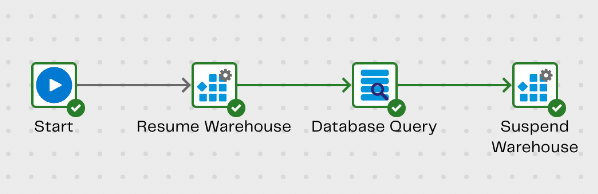
Snowflake allows you to scale your compute resources up or down based on demand. Use Matillion’s Alter Warehouse component to control the warehouse size within any given Orchestration job. Start or scale up at the beginning, spin or scale down at the end to save when the compute resources aren’t needed.
#2 Utilize Materialized Views
A materialized view is a database object that contains the results of a precomputed query, stored as a physical table, enabling faster query performance by avoiding the need to recompute the result set each time the query is executed. Leveraging materialized views in Snowflake helps customers save costs by reducing query processing time and minimizing compute resources, as the pre-computed results stored in materialized views eliminate the need for repeated, expensive computations. Use Matillion to create and manage materialized views.
#3 Optimize Queries
Leverage Snowflake’s Query Profile for detailed insights into a query execution. Leverage Matillion’s Task History to observe query executions and look for opportunities for iterative job design enhancements to improve runtimes.
#4 Compress Data Efficiently
Snowflake supports various compression techniques to minimize storage costs. Compression is primarily automatic in Snowflake, but several methods (e.g. COMPRESSION parameter) are available for users to control compression. Matillion’s Load components also allow users to specify compression settings as needed.

#5 Utilize Time Travel and Fail-safe
Snowflake offers Time Travel and Fail-safe features that allow you to access historical data and for disaster recovery scenarios. But note that these features consume storage credits. Review and adjust the retention periods for Time Travel and Fail-safe to balance data protection requirements with cost optimization goals.
#6 Cluster Tables Effectively
Use clustering keys on your tables to physically organize the data, reducing the need for data sorting during queries and improving performance. Matillion’s SQL Script component enables users to execute SQL against Snowflake, allowing users to apply clustering keys via the ALTER TABLE command based on previous job results.
#7 Implement Data Lifecycle Management
Implement data retention policies to automatically purge data from Snowflake as it becomes unneeded. Matillion can assist in orchestrating and automating tasks related to data retention policies.
- Developers can create workflows that automate data archival or deletion processes based on schedules or triggers.
- Via the SQL Script component, Matillion can integrate with Snowflake Tasks to schedule and execute SQL scripts that implement data retention policies.
#8 Enable Query Caching
Leverage Snowflake’s query caching feature to cache and reuse frequently executed queries, reducing compute costs and improving query performance for recurring workloads. Use Matillion to easily schedule recurring pipeline executions to ensure you are taking advantage of Snowflake data caches.
#9 Sample Data During Development
Use data sampling techniques to reduce processing time and costs during development and test phases. Matillion’s Sample feature enables developers to generate representative samples during pipeline development.

#10 Monitor and Alert on Performance
Continuously monitor Snowflake usage and performance metrics using Snowflake’s built-in resource monitor capabilities. Resource monitors can:
- Track warehouse utilization metrics such as CPU usage and credits consumed
- Provide insights into query execution times and resource consumption
- Track storage consumption by tables and databases
By leveraging Snowflake’s resource monitor feature, customers can gain visibility into their usage patterns and ultimately achieve cost savings through better management of compute and storage resources.
How Matillion Helps as a Snowflake Cost Management Tool
Matillion offers several built-in features that make it one of the best Snowflake cost management tools on the market. It’s designed to work seamlessly with Snowflake, enabling users to optimize performance and reduce costs through automation, orchestration, and visibility. Here’s how:
- Dynamic Resource Scaling: Automatically scale Snowflake warehouses up or down in orchestration jobs to avoid idle compute charges.
- Job-Level Visibility: Leverage Matillion’s Task History to monitor job execution times, identify bottlenecks, and reduce inefficient processing.
- Orchestrated Cost-Saving Workflows: Automate data archival, deletion, and clustering to control storage usage without manual intervention.
- Integrated SQL Execution: Use the SQL Script component to directly run Snowflake-native cost-saving commands, such as altering clustering keys or purging data.
- Scheduling for Query Caching: Schedule frequent pipeline runs to maximize query cache hits and reduce repeated compute effort.
These Snowflake cost management tool features are designed not just for one-time optimization, but for ongoing efficiency improvements across your data pipeline.
To Conclude
Mastering the art of optimizing costs and performance in Snowflake involves an approach that encompasses advanced features, efficient workflows, and continuous monitoring of usage patterns. With the aid of a tool like Matillion, orchestrating these strategies becomes more manageable, allowing users to automate processes and improve iteratively. With a proactive mindset towards cost optimization, organizations can successfully harness the full potential of Snowflake while staying within budget constraints.
Snowflake Optimization FAQs
You can reduce Snowflake costs by right-sizing warehouses, enabling query caching, optimizing queries, and using tools like Matillion to automate data lifecycle tasks. These methods reduce resource usage while maintaining speed and efficiency.
Yes, Matillion allows you to scale Snowflake virtual warehouses dynamically using the Alter Warehouse component in orchestration jobs. This ensures compute resources are only used when needed.
Matillion is considered one of the best tools because it combines orchestration, monitoring, SQL automation, and lifecycle management into one platform. It’s built for Snowflake and helps teams proactively control costs without complex coding.
Common mistakes include:
- Leaving warehouses running when idle
- Overusing Time Travel and Fail-safe features
- Not leveraging caching or materialized views
- Storing outdated or redundant data
- Ignoring query performance issues
Using a tool like Matillion helps prevent these pitfalls.
Matillion allows you to control Snowflake virtual warehouses programmatically. Using its Alter Warehouse component, you can scale up at the beginning of a job and scale down or suspend at the end, preventing unnecessary compute usage and reducing costs.
Matillion offers a wide range of features to help manage and reduce Snowflake costs, including:
- Warehouse right-sizing with the Alter Warehouse component
- Query optimization via Task History and performance monitoring
- Materialized view creation to reduce repetitive compute
- Lifecycle automation for data retention and purging
- Scheduled orchestration to maximize caching efficiency
- Custom SQL scripting for clustering and policy enforcement
Matillion is purpose-built for Snowflake and combines orchestration, automation, monitoring, and cost management into a single platform. It enables both data engineers and less technical users to reduce costs without writing complex code or relying on manual processes.
Try it free: Start your trial

Steph Van Handel
Delivery Solution Architect
Featured Resources
ETL and SQL: How They Work Together in Modern Data Integration
Explore how SQL and ETL power modern data workflows, when to use SQL scripts vs ETL tools, and how Matillion blends automation ...
WhitepapersUnlocking Data Productivity: A DataOps Guide for High-performance Data Teams
Download the DataOps White Paper today and start building data pipelines that are scalable, reliable, and built for success.
BlogWebhooks and Pushdown Python: Building Interactive and Efficient Data Applications
Part 5 of our blog series demonstrating the art of the possible, using Matillion products and features to build the MatiHelper ...
Share: